my eBay auctions
my Amazon wishlist
join Rpoints
nothing to see
yeah but is it art
blogjam
linkmachinego
penguin of doom
nice cup of tea and a sit down
gekki.net
joua.net
bluehsworld
digital god
fairmania
chris green
motorman
prozactualise
men in hats (RIP)
real life
sluggy
dilbert
garfield
you damn kid
xkcd
cyanide & happiness
A/S/L: 37, Male, Weston-super-Mare, UK
Marital: Relationship
Interests: My kids, movies, music, literature and computing
|
| Finally, an update |
|
Its been a long time since I updated. Not due to keyboard problems or PC problems though. Just busy and stuff.
Anyway, whats been happening?
April 1st - Rhiannons 7th Birthday
Rhiannon got lots of Bratz presents for her birthday (from me, Shell and Shells mum) and Shell also got her some clothes and a massive pink fluffy beanbag. Typically, she loved the bean bag more than anything else...
Happy 7th Birthday Rhiannon

Yesterday morning, I woke Shell up at 9am and we booked a holiday for the end of April for 7 days. We are going to the Titanic Hotel Resort and Aquapark in Hurghada, Egypt
See here and here for more details.
Its basically a "sit-by-the-pool-sunbathe-drink-and-relax" type of holiday. If we enjoy Egypt, then we are planning on going back next year to do the tourist thing - Luxor, Giza, etc, etc
On the PC front, I am planning on making my situation cleaner, cheaper and less messy.
I currently have (in my rack):
RM Celeron 333 Desktop, 128mb, 4.3Gb running Smoothwall (this is my gateway, router, firewall machine)
Mini AT Tower Pentium 233MMX, 64mb running NASlite+ (this is my 240Gb NAS box)
Midi ATX P3-733, 128mb, 6.4Gb running e-smith server (this is my mail, web, proxy server)
By the time I go on holiday, I shall have (in the rack):
Compaq Deskpro EN SFF, P3-833, 128mb, 20gb running Smoothwall
Compaq Deskpro EN SFF, P3-1000, 256mb, 20gb running e-smith server
Midi ATX P3-733, 128mb running NASlite+ (with 320Gb of disk space)
I also have a new machine on the way for Rhiannon to use.
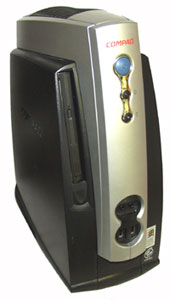
Intel Pentium PIII 866Hz
128mb SD PC 133 Ram
10GB Hard Drive
Multibay 24x CD ROM
On-Board Graphics
On-Board Sound
USB Ports
Network Port
Perfect for a machine used to surf to 3 or 4 websites and run Macromedia Flash and a couple of kids games.
This means of course, that I will have a load of kit to get rid of. If anyone is in need of a midi-ATX case (can hold 6 hdds and 3 optical), with an Epox D3VA motherboard, 2 matched P3-733s, basic gfx card, and a Compaq NC-3123 PCI Dual Ethernet card. No drives, optical drives or RAM suppplied.
|
[ 2 comments : Add | Read ] |
[link] Posted @ 14:51 |
|
Saturday, 25th March 2006
|
|
|
|
Just an update to say that there isn't yet an update.
Erm.
|
[ 3 comments : Add | Read ] |
[link] Posted @ 22:12 |
|
Thursday, 16th March 2006
|
|
|
|
I've been ill. Has the flu, not man-flu but the full blown flu. Unable to move my head, eyes feeling like they are trying to burst out of their sockets, joints aching, feeling sick, congested/runny/congested/runny/etc nose, throat thats on fire, hacking cough...
I should be dead, you know. One of the longest times I've ever spent off of work - last Thursday afternoon until today!
Having lots of time off has enabled to collect a load of "interesting" links for you all, so here goes. These have come from various places such as del.icio.us, digg and Life Hacker.
Read. Enjoy. Expand your mind :)
Desktask
The Best Free Games
FlickrLeech
Cheap screen printing
Capsaicin to kill cancer cells?
6 Stroke Engine anyone?
ASCII art was around as far back as 1948
Kororaa Live CD with XGL. See it and believe it!
Make your own blue/green screen
|
[ 2 comments : Add | Read ] |
[link] Posted @ 12:31 |
| Phishing |
|
I have received a fair few phishing mails recently (all of them caught by my mail server and deleted/marked as such) and I have been reading through a couple to see if they would make me suspicious.
Here are some notable things that make them stand out as fake emails:
1/ The email is actually a GIF not text...
2/ When you hover over the GIF, the status bar tells you where the link goes, which isn't eBay...
3/ The grammar is atrocious:
As Romania is one of the most high rated fraudulent countries, we temporarily blocked your account to avoid future problems or misusage of your eBay account.
If you are travelling and made these login attempts yourself or borrowed your eBay account to someone else, please log in below.
Therefore, I will rate this phishing attempt:
* Why are you bothering, you juvenile fucktard!
** Needs a lot of work. Please try harder
*** Needs work
**** Almost got me.
***** Woah! You're a clever bastard...
|
[ 1 comments : Add | Read ] |
[link] Posted @ 14:13 |
|
|
Oddly, this isn't new news (new news?). Back in September of last year, the BBC reported that Ask Jeeves would be dropping their butler image and going in a different direction. I remember commenting to Shell about it at the time (as she was an Ask Jeeves fan as opposed to me being a Google fan), though she didn't really believe me, especially as we have since seen adverts for Ask on TV featuring said butler...)
However, today it is all looking a bit more likely as reported here. So Jeeves, the butler, is getting the boot. Frankly, I couldn't give a toss, as I have never been a fan of Ask anyway. Shell has since moved away from Ask and now uses Searchy or something.
But for reference, here is a picture of Jeeves. Just in case, anyone ever forgets what he looked like.

(to the tune of "Candle In The Wind")
Goodby Butler Jeeves
though I never searched you at all
you had the grace to uphold yourself
while your search engine crawled
They bought you at InterActiveCorp
where they disregard your fame
they set you on a treadmill
and they made you change your name
and it seems to me, you searched the net
like a spider on its web
never knowing what to look for
until we typed it in
and I would have liked to have asked you
but I�m a Google kid
your logo burned out long before
your engine ever did�
(c) 2005 Mick Wright/Fishkite
|
[ no comments : Add ] |
[link] Posted @ 11:05 |
|
Wednesday, 1st March 2006
|
|
| A Note to All Spammers |
|
Some time ago, I mentioned on these very pages, that sending me spam addressed from Elvis, wasn't going to fool me into reading it.
Now it would appear, you are not content with sending me my own personal spam, but also spam that is meant to be going to someone else...
For the record, I am not, have never been nor ever will be, Trevor Moyle.
Please stop sending me someone elses spam, you bunch of fucktards!
Tudor
|
[ 1 comments : Add | Read ] |
[link] Posted @ 11:08 |
|
Monday, 27th February 2006
|
|
| Wireless Networking |
|
I thought I would write something technical today, for a change. Here I am, a reasonably well paid Network Engineer and I hardly ever write about anything networky. So here goes:
Having recently spent a large amount of time tuning my own wireless networks and helping out other people with theirs, I thought I would write a quick article about wireless networking. Having also been someone who sits in remote offices and finds unsecured wireless networks, I thought I would write a bit about securing your network.
Q. What range does my wireless network have?
A. The ranges of a home wireless LAN depend on the wireless access point (WAP) used. Things that affect a WAPs range: - the 802.11 protocol used
- the power of the transmitter
- the use of builtin or external aerials
- the type of obstructions or interference
Theoretically, 802.11a has a maximum range of 100ft and 802.11b and 802.11g have a maximum range of 300ft (dependent on whether it is indoors or outdoors - indoors can be a lot less)
Things such as brick walls, metalwork and bunches of electrical cables can reduce the range by more than 25%. 802.11a is a lot more susceptible to obstructions and interference than 802.11b/g, but all types can be affected. You can extend a Wi-Fi LAN by using multiple wireless access points - look for devices that support technologies like extenders, repeaters or bridging such as WDS (Wireless Distribution System). You can also increase the power of the transmitters by the use of external aerials or boosters.
Q. What can I do to secure my wireless network?
A. Several things- Change the default password
Most access points have a documented default password for when you first setup your wireless network, so that you can configure your access point to suit your needs. Change the password to something you remember and use a strong password by mixing upper and lower case with numbers. It makes password cracking by brute force (running through a list of possible words) much, much harder. - Turn on encryption
All wireless equipment supports encryption of some degree or other. Encryption means that the information sent between the wireless devices is scrambled and made unreadable unless you know what the "key" is. The two most common methods of encryption is WEP or WPA. They both rely on keys or passphrases which must be configured on the access point and on all the devices using the network. At the time of writing, WEP encryption has been cracked (it takes some time but it can be done) whereas WPA/WPA2 is still safe to use. Turn on encryption - Change the Default SSID
All access points and routers come with a default network name or SSID. Most manufacturers send out their products with the same default SSID, such as "belkin54g", "linksys", etc. If someone finds your wireless network and can see a default SSID, they already know what equipment you are using. If they know what equipment you are using and you haven't changed the password (see above), they can start working on getting into your network. So change the default SSID. - Enable MAC Address Filtering
Every piece of networking equipment (wired or wireless) has a unique identifier called the "MAC address." Wireless access points use the MAC addresses to track what connects to them. Most access points give you the option to "filter" these address or limit what MAC addresses can connect to it. Set MAC address filtering on and add the addresses of all the wireless equipment you are using. - Disable SSID Broadcast
By default, most access points broadcast their network name (SSID) to all and sundry. The problem here is that if you have left your SSID at the default, you could be telling people what kit you have and that can lead to lots of problems (see above). If you have changed it, all the better, but having it broadcast can leave others tempted to try and have a go. As long as you know what the SSID is for your network (for when you are configuring new devices), you dont need it broadcast. Turn it off. - Don't use DHCP
Most networks use dynamic IP addressing (DHCP), as it makes life easier and requires less management. However, should someone be able to get access to your network, it will automagically give them an IP address on your network and they then have pretty much unfettered access to everything your network provides. Turn off DHCP and assign static IP address to each device on your network.
|
[ 3 comments : Add | Read ] |
[link] Posted @ 21:26 |
|
Tuesday, 21st February 2006
|
|
| Geekdom |
|
My Bluetooth GPS finally arrived, so after a few hours of charging, off I went with it. Around Weston. Which I know like the back of my hand! How pointless...
But I found a great piece of software for the Palm - QuickDest. By plonking in a description and the lat/long coordinates, you can set up a set of buttons. Pressing the button takes you into ViaMichelin (MapSonic) and sets it as the destination point, so pressing "Navigate to" is all thats left.
I have also, finally, got myself an HP Jornada 720 from eBay. Got one in good enough condition and with the right collection of accessories at the right price - its taken quite a while. I have a 256Mb CF card on order (largest it can take) and a shedload of software ready to install on it.
Its main use will be when I need to connect to a switch or router to change/update/install the config or do some troubleshooting. The great thing is that the one I've purchased comes with the correct cable for me to do this. Huzzah!
All I need now are supported Wireless and Wired PCMCIA cards and it will be my ultimate portable network troubleshooting device. I rock sometimes, I really do. In a sad way though...
Shell is feeling much better and the pain is almost non-existent. However, she does find herself tiring very easily, so fortunately she has been cramming in time getting a couple of things sorted out - watching the Winter Olympics and starting Shellection, an online fashion shop.
Sunday night saw Chandler being pretty ill. Multitude of sick, being showered down, changing all the bedding, etc, etc. He felt quite a bit better (after a very long sleep on Monday morning), so Shell took him shopping to Street with her. Where he managed to wangle a Batman Begins Batmobile:
Fortunately, its staying at our house, so I can get to play with it while he is away.
Todays link is - Make your own Simpsons Character
|
[ no comments : Add ] |
[link] Posted @ 20:33 |
|
Monday, 13th February 2006
|
|
| Palmfan! |
|
So then - my Palm Tungsten T turned up and in no time at all, I installed various pieces of software!
- ZLauncher - a replacement for the built-in launcher with tabs, shortcuts and all sorts.
- ViaMichelin - a GPS route mapping system
- Bejeweled 2 - one of the best puzzle games on the market, I can now play it on the go, on my PC and on my laptop!
- Pocket Tunes - an advanced MP3 player
All that (plus a load of network utilities and a shed load of e-books) means I can work, rest and play on the thing, while navigating my way around the country.
I also managed to bag a bargain Arkon Powered PDA Mount for the car, that powers the PDA, amplifies the headphone output and provides power for the GPS unit!
All I need now is for the damn Bluetooth GPS unit I ordered to eventually turn up...
|
[ no comments : Add ] |
[link] Posted @ 22:33 |
|
Monday, 6th February 2006
|
|
|
|

